
The Building Blocks of a Smart Home
Anyone can recognise a box of Lego bricks. Some are large, some are small, and each piece has its own shape, purpose, and place in the model. But knowing the bricks is not the same as knowing how to build the set. For that, you need more than the pieces themselves. You also need to understand how they fit together, which role each one plays, and what the finished result is supposed to become.
A smart home works in much the same way.

Many people first encounter smart home technology through the things they can see and buy: a sensor, a smart bulb, a plug, a camera, a thermostat, a hub. These are the most visible building blocks, and because they are visible, they also tend to get most of the attention. They are easy to compare, easy to market, and easy to think of as the “real” smart home.
But they are only part of the story.
A smart home is not built only from physical devices. It is also built from less visible parts that are just as important: the connectivity that allows devices to communicate, the infrastructure that supports them, the logic that determines what should happen and when, and the interfaces that allow people to understand, control, and trust the system in everyday life.
That is why it is often misleading to think of a smart home as a collection of gadgets. A more useful way to think about it is as a collection of building blocks with different roles. Some of those roles are visible and tangible. You can mount them, charge them, replace them, or hold them in your hand. Others are invisible, but they shape almost everything about how the home behaves in practice.
This distinction matters because many smart home frustrations begin in exactly the gap between the visible and the invisible.
People buy a good device and assume the problem is solved, only to discover that the real limitation was weak Wi-Fi, poor placement, the wrong platform, brittle automations, unclear control points, or an unstable network foundation. The visible product gets the credit or the blame, but the experience is often determined somewhere deeper in the system.
That is also why two homes can contain similar devices and still feel completely different. One may feel calm, reliable, and almost effortless to live with. Another may feel awkward, fragmented, and strangely fragile. The difference is often not the hardware alone, but the quality of the design around it – the invisible layers that connect, support, and coordinate the visible parts.
So before looking at specific products or deciding what to add next, it helps to understand the building blocks themselves. Not just what they are called, but what role they play. Some parts detect what is happening. Some parts act in the physical world. Some parts coordinate the system. Some parts carry communication. Some parts provide logic. Some parts make the system usable for the household. And some parts form the foundation that everything else depends on.
Once those roles become clear, the smart home also becomes clearer. It stops looking like a pile of disconnected devices and starts looking like a system that can be designed more deliberately, understood more realistically, and improved with better decisions over time.
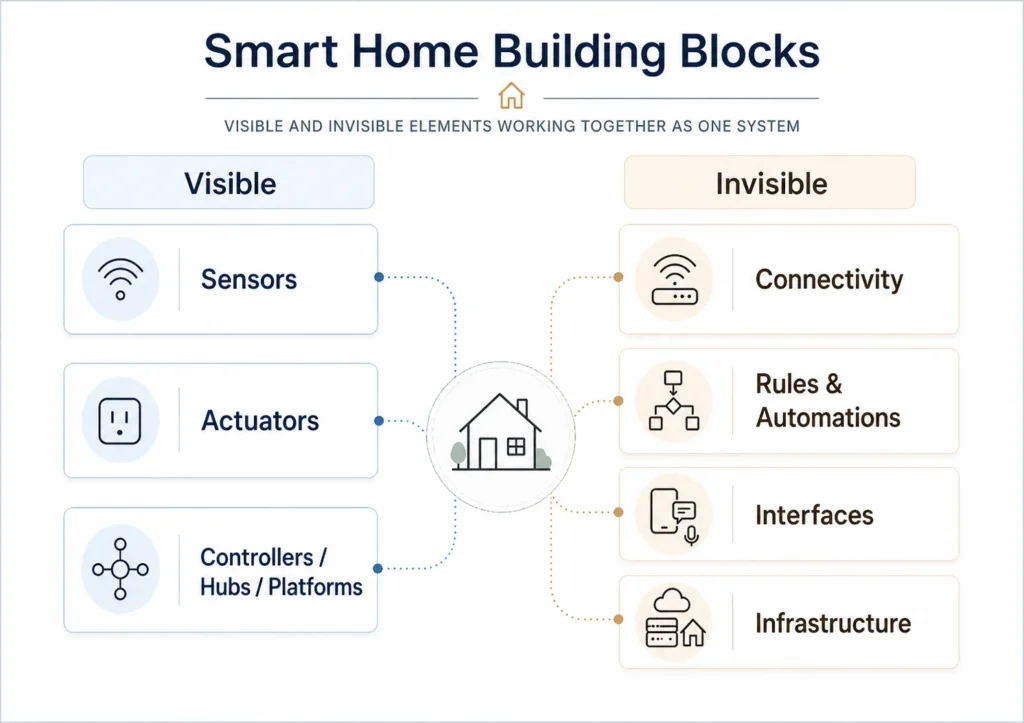
The Visible Building Blocks
Sensors – what detects the world
Sensors are the input layer of a smart home. They tell the system what is happening in the home and around it.
A motion sensor can detect movement in a hallway. A door or window sensor can report whether something is open or closed. Temperature and humidity sensors can show how a room feels. Water leak sensors can warn about problems before they become expensive. Smoke or air quality sensors can reveal conditions that matter for safety and comfort.
Without sensors, the system knows very little. It may still be possible to control devices manually or through an app, but many useful automations become impossible or unreliable because the home has too little awareness of what is happening.
At the same time, sensors do not always appear as separate products. In many real-world setups, sensing is built into the device that later performs an action. A light or lamp may include a motion sensor. A camera may include motion, presence, or microwave-based detection. A thermostat may contain temperature sensing as part of the same unit that also controls heating. In practice, that means one device can play more than one role in the system.
Phones and smart watches can also function as sensors in the system. Their location, proximity, or presence can be used to trigger automations when someone arrives home, leaves home, or moves between contexts. In that role, the device is not just something the user controls manually, but also a source of input that helps the home respond to people more intelligently.
Small tracking devices such as smart tags can also play a sensing role. They can be used to detect presence, location, or proximity and may support useful scenarios both inside and outside the home, depending on the platform and setup.
This is worth understanding, because the categories are meant to clarify roles, not to suggest that every role always lives in a separate box. What matters is not whether the sensor is standalone, but whether the home has reliable ways of detecting what is happening.
This is why sensors are so important. They are not flashy, but they are often what make the difference between a connected home and a responsive one.
Actuators – what does something
If sensors are the input layer, actuators are the output layer.
Actuators are the devices that do something in the physical world. A bulb turns on. A smart plug cuts power. A thermostat changes temperature. A lock secures a door. A valve opens or closes. A curtain motor moves a blind. A siren makes noise.
But the category is broader than many people first assume. In a real home, actuators also include devices such as robot vacuum cleaners, robot lawn mowers, connected appliances, and EV charging systems. These may not always be marketed as classic smart home products, but they still play the same basic role: they receive input, follow logic or commands, and create a physical outcome in the real world.
That broader view matters because it shows that smart home building blocks are not limited to small gadgets mounted on walls or plugged into outlets. They can also include larger systems and appliances that become part of the home’s wider automation and control model.
These are the parts that turn system decisions into visible results.
That also explains why actuators are often the most noticeable smart home products. People see the light change, hear the lock engage, watch the vacuum start, or notice that charging begins at a certain time. But even though actuators are highly visible, they do not make the home smart on their own. They only become part of a smart system when they are connected to useful inputs, sensible logic, and reliable infrastructure.
Controllers, hubs, and platforms – what coordinates the system
This is one of the most important building blocks in the entire setup.
A smart home needs some way of connecting devices, interpreting information, applying logic, and keeping track of what is going on. That coordinating role is typically handled by a controller, a hub, a platform, or some combination of the three.
Some controllers and hubs are physical devices, while platforms often combine software, cloud services, and sometimes local hardware.
In simple terms, this is the part that acts as the system’s brain.
It is where devices are brought together, where automations are defined, where states are tracked, and where different parts of the home are made to work in relation to each other. Without this layer, you often end up with isolated devices that each do their own thing, but never become part of a larger whole.
In practice, there are two broad ways this role appears.
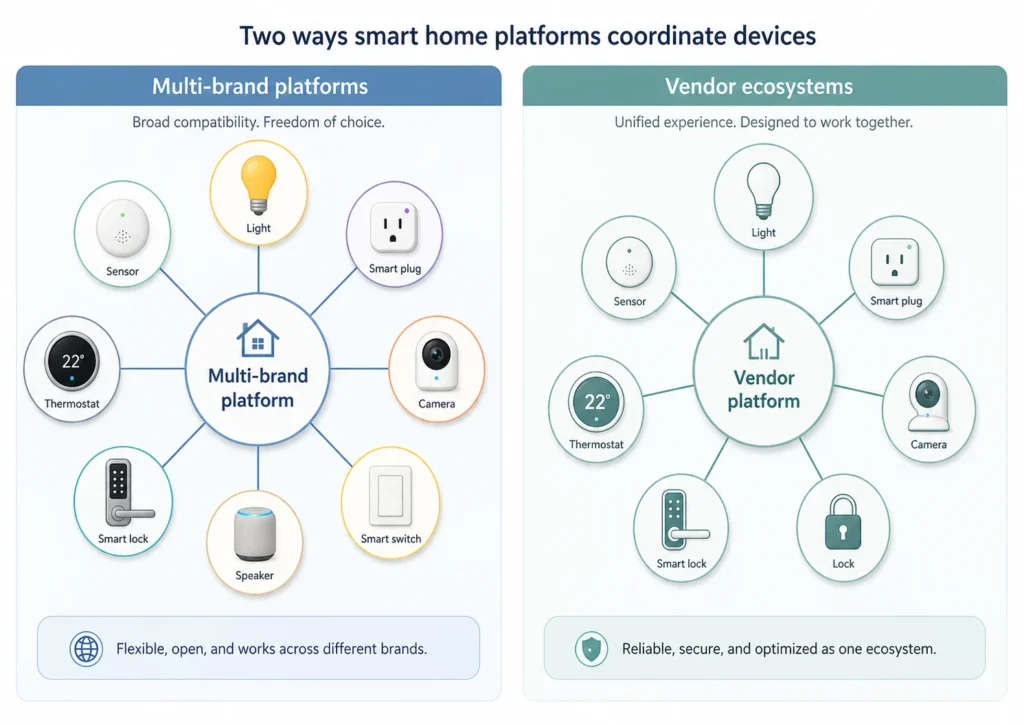
Multi-brand platforms
Some platforms are designed to bring together devices across brands, ecosystems, and sometimes protocols. Google Home, Amazon Alexa, Apple Home, Samsung SmartThings, Home Assistant, and Homey all sit in this broader category, even though they differ significantly in philosophy and capability.
Some are simpler and more consumer-friendly. Some are more flexible and more technical. Some lean heavily on cloud services. Others place more emphasis on local control. Some also depend on specific hub devices for certain functions. In practice, they are best understood as broad multi-brand platforms rather than truly universal ones.
Vendor ecosystems
Other platforms are tied more closely to a specific manufacturer or product family. Aqara, Philips Hue, IKEA Dirigera, Bosch Smart Home, and tado are examples of ecosystems where the app, controller, automation model, and devices are designed to work primarily within one brand’s environment.
These systems can be easier to understand and often feel more tightly integrated out of the box. But they may also offer less flexibility than broader multi-brand platforms unless they support standards such as Matter or strong third-party integrations. In other words, they are not necessarily closed, but their openness and long-term flexibility can vary considerably from one ecosystem to another.
Why this matters
This choice matters more than many beginners expect.
The platform layer shapes what can connect, how automations behave, how much flexibility you have later, how stable the experience feels, and how much control you really hold over the system. It is not the only important decision in a smart home, but it is one of the most consequential ones.
This is also one of the reasons lightweight planning becomes useful surprisingly early. A simple Use Case Canvas can help clarify what you want the home to achieve before you start choosing platforms and devices, while a Capability Map can help separate household needs from the specific products you happen to be considering.
The Invisible Building Blocks
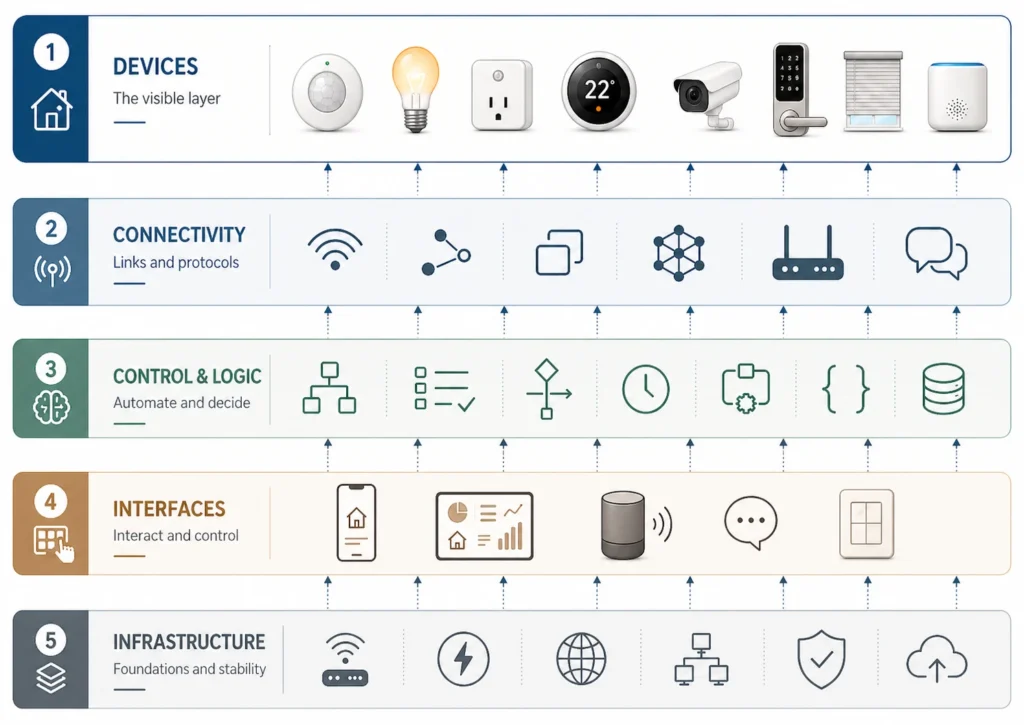
Connectivity – what lets the parts communicate
Connectivity is the communication layer of the smart home.
This is where technologies such as Wi-Fi, Zigbee, Thread, and Bluetooth come into the picture, along with standards such as Matter that help devices work across ecosystems. They are not gadgets in themselves. They shape how devices communicate, coordinate, and exchange information. Matter is especially useful to think of as a common application standard built on top of underlying network technologies rather than as just another transport in the same category as Wi-Fi or Thread.
Bluetooth also deserves a small nuance. In smart home setups, it is often used for setup, onboarding, or short-range communication, and in some cases through Bluetooth Mesh for larger many-to-many networks. But it is not always the main communication backbone in the way Wi-Fi or Thread often are.
This layer affects far more than convenience. It influences range, stability, battery life, responsiveness, and interoperability. In practice, many smart home problems that look like “device problems” are really communication problems.
A sensor that misses events, a lock that responds slowly, or a plug that appears offline may not be failing because the device is bad. The issue may be weak coverage, poor placement, protocol limitations, network design, or a bad fit between device type and connectivity choice.
That is why connectivity matters so much. It is one of the least glamorous parts of a smart home, but one of the most important.
Rules, automations, and scenes – what makes the home behave intelligently
This is the logic layer.
Rules and automations define what should happen when certain conditions are met. A motion sensor detects movement after sunset, so the hallway light turns on. Nobody is home, so the heating drops. A leak sensor is triggered, so an alert is sent immediately.
Scenes work slightly differently. Instead of responding to an event, they usually gather several actions into one intended state, such as “Good Night,” “Away,” or “Movie Time.”
This is where a smart home becomes more than remote control.
Without logic, most smart home devices are simply app-controlled devices. They may be convenient, but they still depend on a person opening an app and telling the home what to do. With useful automations and scenes, the home begins to behave in ways that are more proactive, more consistent, and less dependent on constant manual control.
This is also why the platform layer matters so much. Different platforms and ecosystems offer very different levels of automation capability. Some are intentionally simple. Others are much more flexible. Some run logic locally. Others depend more heavily on the cloud. Those choices affect how powerful, reliable, and maintainable your smart home can become.
Interfaces and control points – how people interact with the system
No matter how much automation you build, people still need ways to interact with the system.
That interaction can happen through apps, dashboards, voice assistants, wall switches, remotes, smart buttons, touch panels, or ordinary physical controls. These are the control points where the household meets the smart home directly.
The phone is especially important because it often serves two roles at once. It is both the personal remote control for the system and, in many setups, a source of presence and location data that can influence how the home behaves. In some ecosystems, smart watches can play a similar part, especially when presence, proximity, notifications, or quick control are involved.
This is easy to underestimate, especially if the person building the system is comfortable with apps and settings. But a smart home is not only a technical system. It is also a lived environment. If the people in the home do not understand how to use it, trust it, or override it when needed, then the design is already weak.
That is why interfaces should not be treated as an afterthought. They are part of the system design. A home that works beautifully in theory but confuses the household in practice is not well designed.
The best control points tend to feel obvious. They reduce friction rather than adding it. They let people do what they need to do without forcing them to care about the architecture behind the scenes.
Infrastructure – what everything else depends on
Infrastructure is the foundation beneath everything else.
This includes power, internet access, local networking, Wi-Fi coverage, physical placement, and the overall technical stability of the home. In some homes it may also include more deliberate network design choices such as VLANs, IoT networks, or guest networks. Not every household needs those things, but every smart home depends on some form of underlying infrastructure.
This layer is easy to ignore because it is mostly invisible when it works. But when it is weak, the problems show up everywhere else. Devices disconnect. Automations become unreliable. Delays appear. Coverage becomes uneven. Troubleshooting gets harder. The whole home feels more fragile than it should.
This is why infrastructure deserves more respect than it usually gets. The system is only as dependable as the foundation it rests on.
As the setup grows, this is also where documentation starts to matter more. A Smart Home Handbook can make it easier to keep track of what is installed, how it is connected, and which parts depend on which others. Even a small risk register can be useful once the home starts to rely on shared functions, automations, connectivity, or fallback plans.
Why the Invisible Design Often Matters Most
The visible building blocks are important because they are the things that actually sense, act, and appear in the home. But the invisible building blocks often determine whether those visible parts ever become a coherent system.
That is the part many people miss.
They compare devices carefully, but think less about connectivity. They buy new hardware, but do not think much about infrastructure. They install apps, but give little thought to control design. They want automation, but have not yet decided how the system should think or what role the platform should play.
As a result, the visible parts often get too much attention while the invisible design gets too little.
And yet it is often the invisible layer that decides the real quality of the home. It shapes stability, user experience, resilience, maintainability, and how well the system can grow without becoming messy.
This does not mean the physical devices are secondary. It means they are only one half of the picture. A smart home becomes good when the visible and invisible parts support one another properly.
You Need Both the Bricks and the Plan
This brings us back to the Lego metaphor.
Knowing the bricks matters. You need to know what each kind of piece does, what role it can play, and where it fits. But that alone is not enough to build something useful.
You also need a plan.
In smart home terms, that does not necessarily mean a giant master blueprint. It can be something much lighter than that. But it does mean you need some idea of what the home is meant to do, which roles need to be covered, how the parts should work together, and what kind of experience you want the household to have.
That is where better decisions begin.
Instead of buying a device just because it looks clever, you start asking what role it is meant to play. Instead of adding more hardware to solve every problem, you start noticing whether the real issue lies in logic, connectivity, infrastructure, or control design. Instead of collecting smart things, you start shaping a system.
This is also where simple artefacts become useful in practice. A Use Case Canvas can help define the household outcome before you choose the pieces. A Capability Map can help you think in roles and functions instead of jumping straight to products. A Backlog and Roadmap can help you prioritise what should come next instead of adding devices at random.
And this is one reason to learn a little, plan a little, and start small. You do not need to master every building block at once. But once you understand the roles they play, it becomes much easier to make smaller, better decisions with more confidence and less guesswork.
That is also why a stable smart home usually grows better through small, deliberate improvements than through random additions. You do not need all the pieces at once. But you do need to understand how the pieces relate.
Key Takeaways
A smart home is built from more than visible devices. It depends on both physical building blocks and less visible design layers.
The visible parts include sensors, actuators, and the controllers, hubs, or platforms that help coordinate the system. The invisible parts include connectivity, automations, scenes, interfaces, and the infrastructure beneath them all.
Each building block has its own role. Sensors provide awareness. Actuators create action. Platforms coordinate. Connectivity carries communication. Automations define behaviour. Interfaces make the system usable. Infrastructure keeps everything standing.
That is why it is not enough to recognise the pieces. You also need to understand how they fit together.
These building blocks can also be understood as layers in a smart home system, where devices, connectivity, control, logic, interfaces, and infrastructure each play a different role. That perspective helps move the conversation from individual parts to the way the whole home actually works.
A better smart home does not come from collecting more bricks. It comes from knowing what you are trying to build and how the pieces need to work as a whole.